
Branding & Integration Guide
An end-to-end guide to the customer experience, from white-labeled brand customisation to secure booking data integration and payment confirmation.
Overview
To ensure a seamless brand experience, our Quote Landing Page (QLP) utilises a dynamic messaging system. This allows partners to customise specific text elements within the widget while maintaining the core functionality of the WeatherIt protection.
This guide provides a visual map of how API fields correspond to the user interface, along with a "Control Table" defining which messages are mandatory for legal and commercial compliance.
Visual Mapping
Quote Landing Page
The Quote Landing Page (QLP) is the primary customer-facing interface where users review their coverage details and complete their purchase. All text elements highlighted below are dynamic and can be managed via our template messaging system
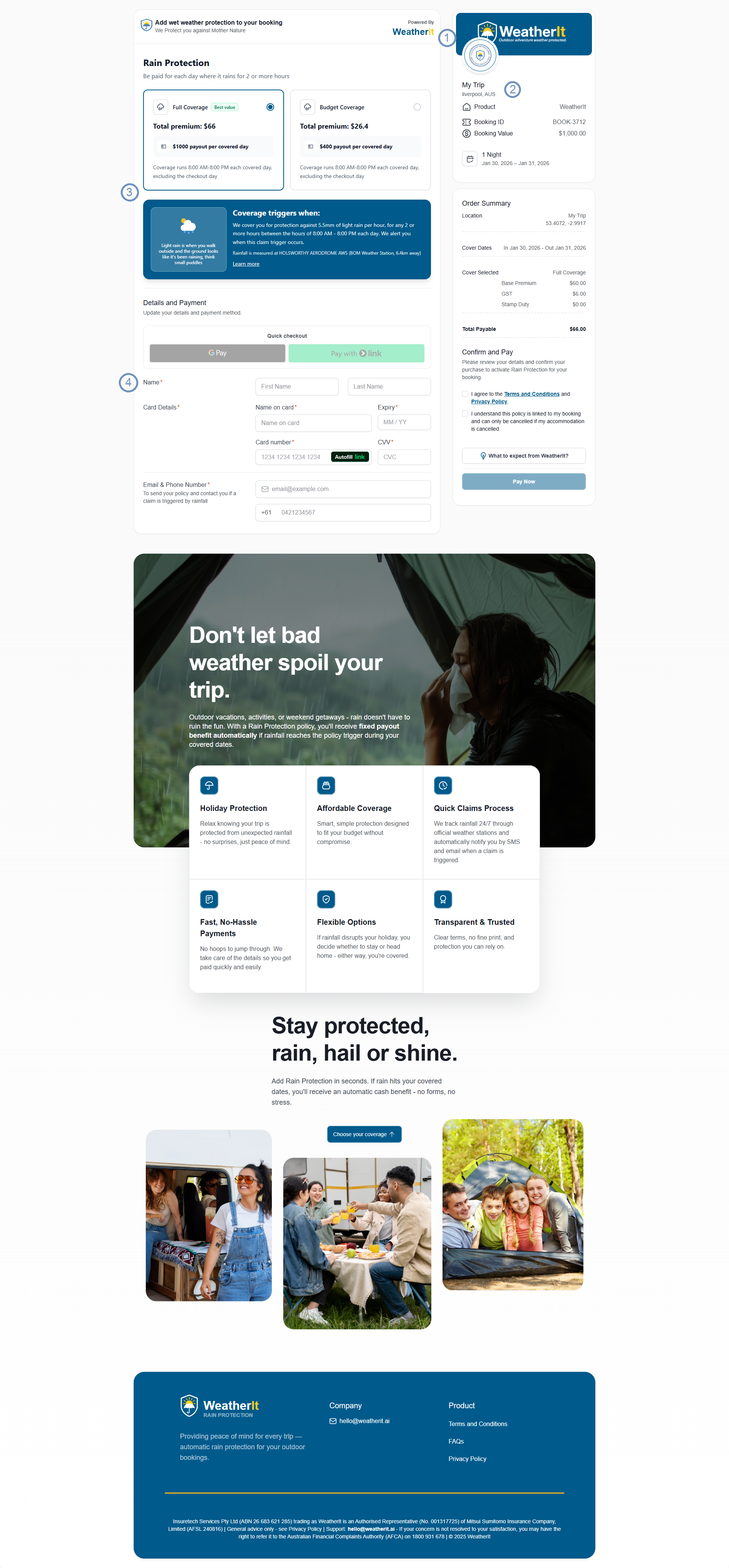
Mapping Key
- Partner & Branding (Provided by Partner)
- Partner Logo: The partner's brand identity displayed in the top header.
Click to view Logo & Asset Specifications
- Preferred Format: SVG (Vector) designed on a 512×512px canvas.
- Alternative: PNG (Transparent) at 512×512px minimum.
- Visibility: Please ensure the logo has sufficient contrast against your chosen brand color or banner background.
- Note: If your standard logo is dark, we recommend providing a "reversed" (white/light) version or a version with high-contrast elements for better legibility.
- Partner Banner: A branded hero image used as a background overlay. If no image is provided, the Primary Brand Color will be used as a solid fill.
- Primary Brand Color: A designated HEX Color Code used to theme the widget (Header background, CTA buttons, and highlights) to match the partner's brand identity.
- Booking Context (Injected via Partner API)
- Booking ID: The unique reference number from the partner’s system (e.g., BOOK-3712).
- Booking Value: The total transaction value provided by the partner to calculate protection premiums.
- Booking Nights: The duration of the stay or trip (e.g., 1 Night or 3 Days).
- Location: The specific geographical destination where the weather protection is active.
- Coverage & Trigger Logic (Dynamic from WeatherIt)
- Coverage Cards: Interactive selection cards showing various protection tiers (e.g., Full Coverage vs. Budget) with their respective Premiums and Payout amounts.
- Trigger Logic: Detailed technical explanation of the weather conditions required to activate a payout (e.g., "Rainfall exceeding 5.5mm during specified hours").
- User Input & Checkout
- Customer Details: Form fields for the user’s name, email, and payment credentials.
- Order Summary: The final billing breakdown, including taxes and fees, displayed before the user confirms the purchase.
Booking Data Integration
To display personalised trip details (Booking ID, Value, Nights, and Location), data must be passed to WeatherIt using one of the three methods below.
Integration Choice Partners can choose the method that best fits their security requirements and technical capabilities.
Method A: API Retrieval (Recommended)
- How it works: You send a simple link with just the booking_id. WeatherIt then calls your API in the background to fetch the trip details.
- Best for: Keeping URLs short and ensuring the most up-to-date pricing.
Method B: Secure Token (Most Secure)
- How it works: Your server exchanges booking data for a "Secure Token" via a POST request. The customer clicks a link containing only that token.
- Best for: Sharing sensitive customer data (PII) securely.
Method C: Native URL (Fastest Setup)
- How it works: All trip details (Lat/Long, dates, amount) are appended directly to the URL as parameters.
- Best for: Quick launches or simple email campaigns where API work isn't possible.
QLP Content Control Table
| Component | What we need from you | Requirement | Why it matters |
|---|---|---|---|
| Brand Logo | SVG or high-res PNG file | Mandatory | Displays your brand identity on the header |
| Brand Color | A HEX color code (e.g., #0047AB) | Mandatory | Themes the buttons and header to match your site |
| Hero Banner | A high-quality background image | Optional | Adds a premium look to the landing page |
| Booking Data | ID, Value, Nights and Location | Mandatory | Passed via URL parameters (standard) or API/Token |
Note on Error Handling: In the event of an invalid link or API failure, a branded Failure Page will be displayed to the user, ensuring brand consistency even when data cannot be retrieved.
The Complete Customer Journey
Beyond the main Quote Landing Page, WeatherIt provides a seamless, branded experience through to the final confirmation.
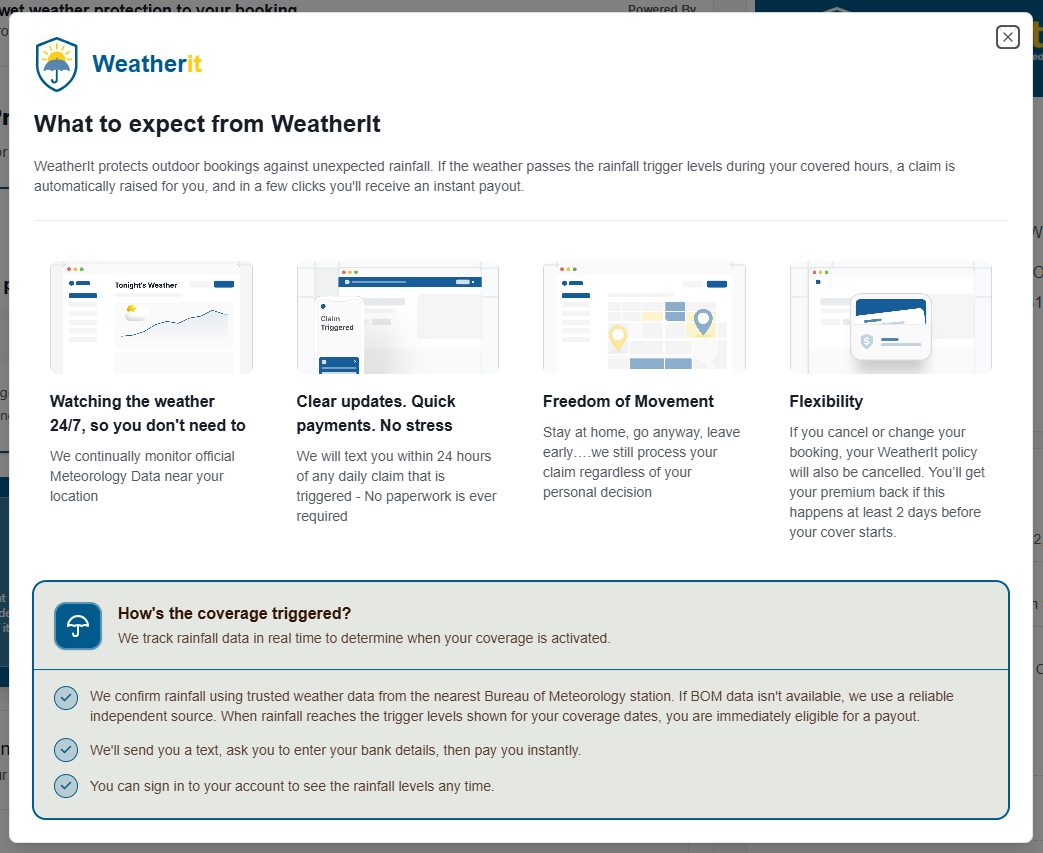
- Protection Details (Information Modal)
When customers want to dive deeper into how the weather monitoring works, they can access a detailed view.
- Focus: Explains the rainfall triggers (e.g., 5.5mm) and the automated payout process.
- Consistency: Keeps the customer on the same page without navigating away.
- Note for Partner: This modal is triggered when a user clicks "Learn More" or "What to expect from WeatherIt" button on the main QLP.
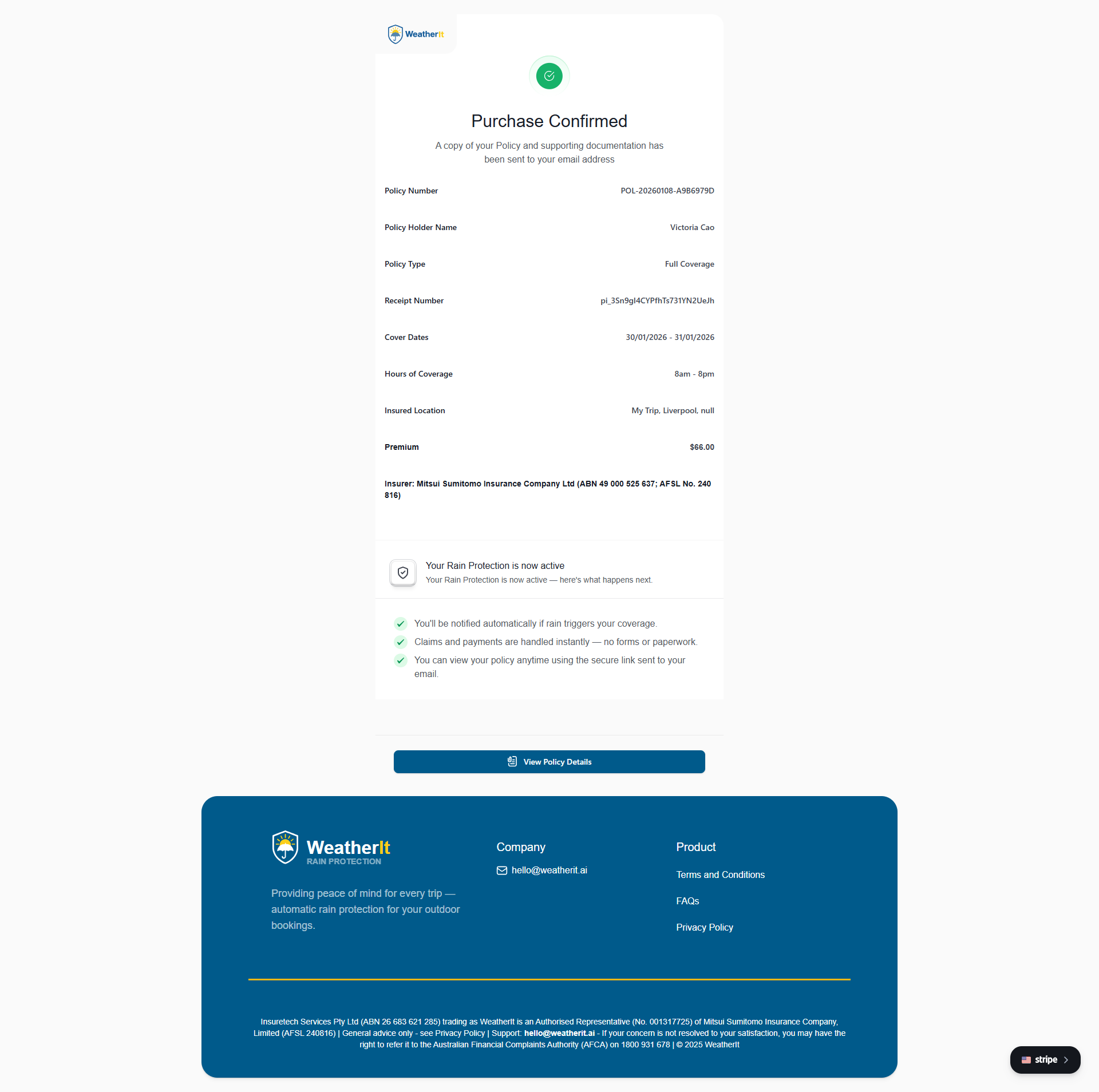
- Payment Confirmation (Success Page)
- Branding: Displays the WeatherIt Logo and official insurer details.
- Reasoning: As the policy is a legal contract between the customer and WeatherIt, this page serves as the official receipt and proof of coverage.
- Key Info: Includes the Policy Number, Coverage Dates, and a summary of the "Protected" trip details.
Updated 7 months ago